
Server health and config backups, from one command.
One small binary for every systemd host. See each service, its ports and log errors on one screen, back up its unit files to your Management Console, and restore any version safely.
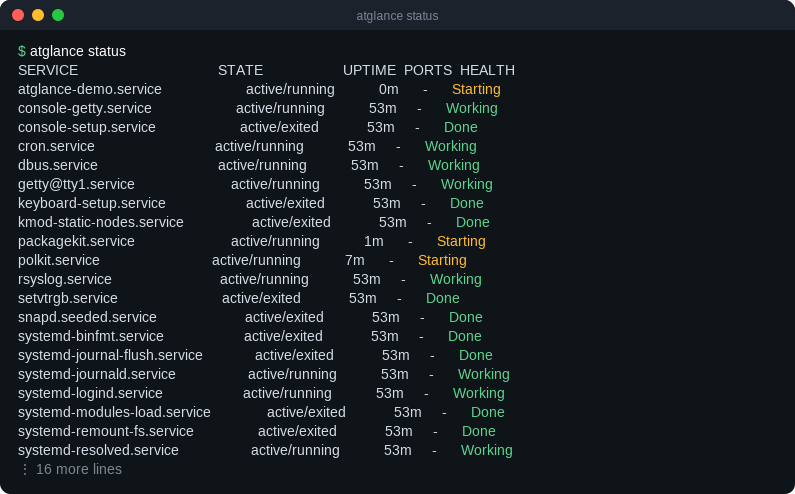
Everything about a server, in one terminal
Health commands work on their own. Connect the console to keep every version of every unit file.
Every service on one screen
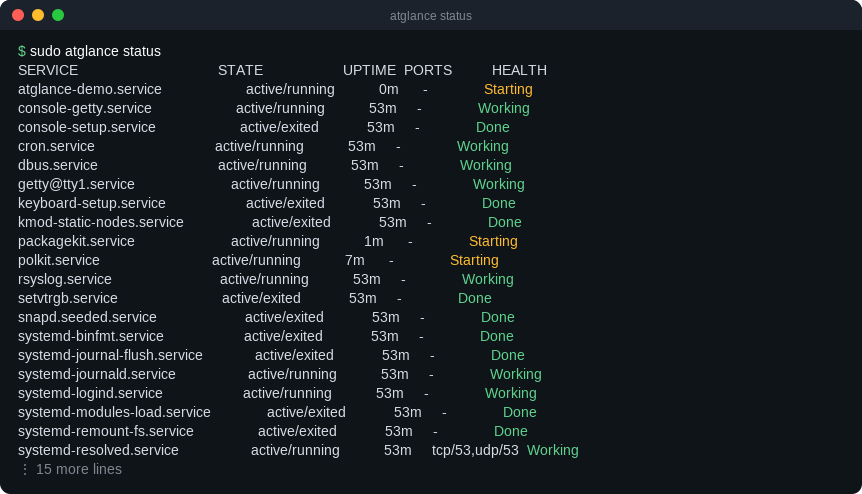
atglance status lists running and failed services with state, uptime, listening ports and health. Application services come first, then the operating system's own.
- --all adds stopped services; --type application or system shows one kind
- Health: Working, Starting, Restarting, Done, Stopped, Failed, Error, Warning
- Exit code 3 when a service is Failed or Restarting, for monitoring checks
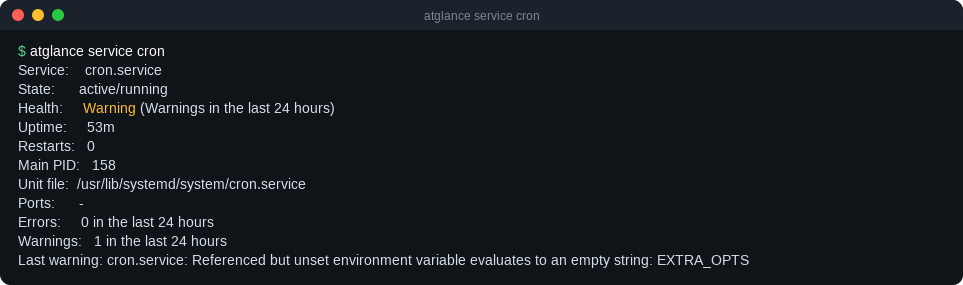
Inspect one service in depth
atglance service nginx shows the unit file, main PID, restarts, ports and how many errors and warnings it logged in the last 24 hours.
- Works with ssh or ssh.service
- JSON with -o json
- watch refreshes the overview every 5 seconds
Connect a server in two commands
Log in with your personal API key, then register. The server makes its own system key and keeps it readable only by root. Keys are never accepted as arguments.
- login, whoami and logout
- system register, status, deregister, reactivate, rotate-key
- A service account key for scheduled runs

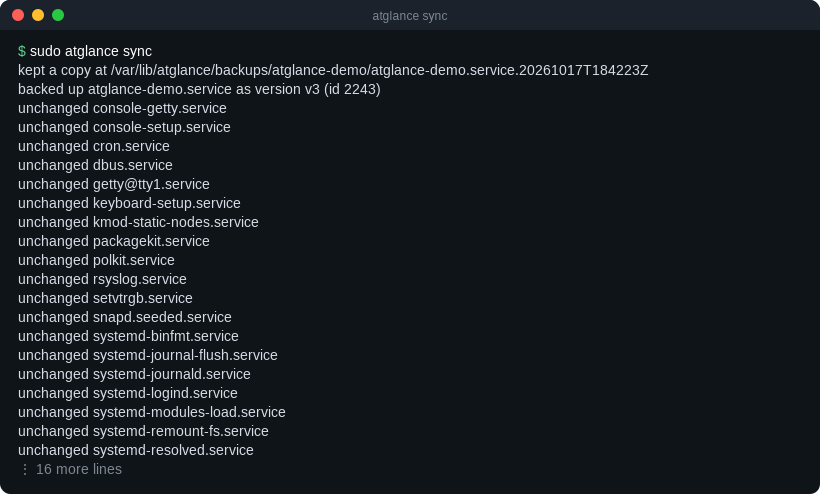
Every change to every unit file, versioned
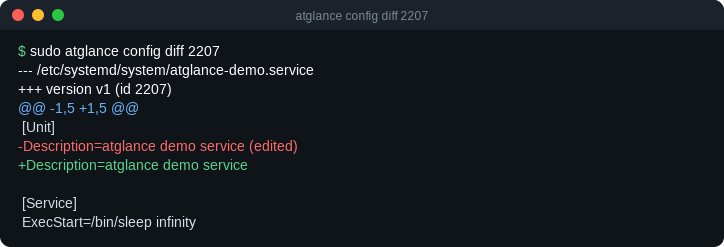
sync backs up every service whose unit file changed and skips the rest. List versions, compare one with the live file, and restore it with an automatic rollback.
- config backup, list, pull, diff and restore
- Offline queue: backups wait until the console is back
- restore refuses the SSH service over SSH, restarts and rolls back on failure
One command checks the whole setup
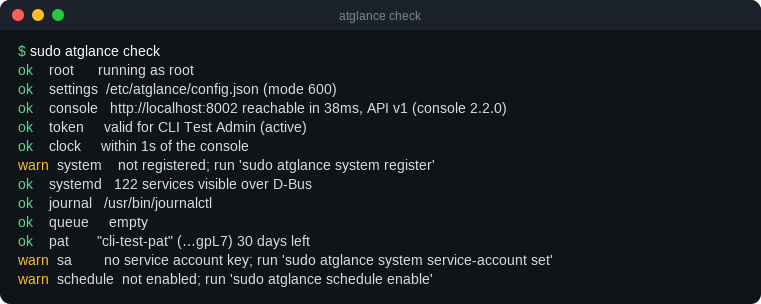
check tests settings, the console, the token, the clock, the system, systemd, the journal, the offline queue, both keys' expiry and the schedule.
- ok, warn or fail per line
- Warns when a key has 15 days or fewer left
- Alias: doctor
Check and sync every day, by itself
schedule enable writes a cron job: a daily check around 06:00 and a daily sync at night, at random minutes so servers do not all call the console at once.
- Runs with the service account key, never your personal key
- Output in the system log: journalctl -t atglance
- schedule status shows the times and last log lines

See who forced what, from the terminal
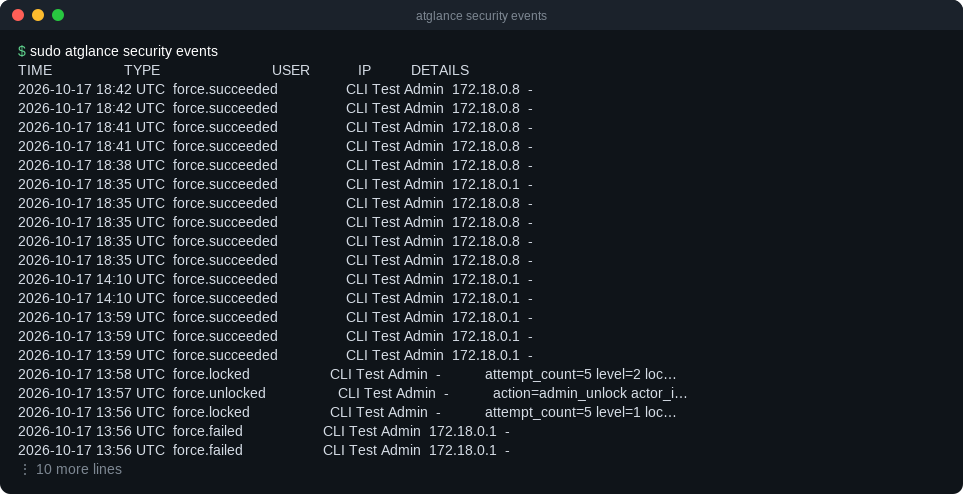
Organisation admins read the security log: failed, successful and locked force actions, newest first, and the accounts that are locked.
- security events with --type, --since, --until, --user
- security lockouts
- Table or JSON output
Small, predictable, scriptable
Packages for every distro
.deb for amd64, arm64 and armhf; .rpm for x86_64 and aarch64; .tar.gz for any systemd Linux.
Fast on a Raspberry Pi
status takes 0.14 s of CPU and under 8 MB of memory on an armv7 board, against 3.45 s for 1.x.
JSON for scripts
export prints every service as JSON, with an optional log summary.
Moves from 1.x by itself
Install over 1.x: settings are imported, the system keeps its id and key, and the old flags still work.
Install in one minute
Pick your system. The package installs /usr/bin/atglance, the man page and bash completion. It adds no service and no cron job.
No CLI files are published yet. See Downloads.
From a new server to versioned backups
Real output from the CLI, step by step. Use the arrow keys or the steps to move.

Every command, one search away
Version 2.2.0. Commands marked sudo need root. The full guide is in man atglance.
Health
No console and no sudo needed.- atglance status [--all] [--type all|system|application] [-o table|json]
- One line per running or failed service: state, uptime, listening ports, health. Application services first, then system services. Exit code 3 when a service is Failed or Restarting.
- atglance service <name> [-o table|json]
- One service in detail: type, state, health, uptime, restarts, main PID, unit file, ports, errors and warnings in the last 24 hours.
- atglance watch [--interval 5s] [--all] [--type T]
- Live status view, refreshed every 5 seconds. Ctrl+C to stop.
- atglance export [--logs] [--type T]
- Every loaded service as JSON, with the unit file path and category. --logs adds a log summary per service.
- atglance version [--json]
- Print the version. --json prints one line for the console: version, OS, architecture, server, system id, registration and service account (never a key).
- atglance help
- Show every command. The man page: man atglance.
Console connection
- sudo atglance login [--server URL]
- Save the console URL and your personal API key (atgla-). The key comes from a hidden prompt, stdin or ATGLANCE_TOKEN, never from an argument.
- sudo atglance whoami
- The console user, organisation, key name and expiry of the saved key.
- sudo atglance check [--scheduled]
- Check the whole setup: settings, console, token, clock, system, systemd, journal, queue, key expiry and schedule. Alias: doctor.
- sudo atglance logout
- Forget the saved key. The system identity stays.
System registration
- sudo atglance system register [--name N] [--tags a,b] [--workspace ID] [--ip ADDRESS] [--service-account] [--force-new]
- Register this server with the console. The server makes its own system key and keeps it in /var/lib/atglance/identity.json (0600).
- sudo atglance system status
- The system as the console sees it: id, name, status, workspace, registered at.
- sudo atglance system deregister [--pin] [--force [--id ID]]
- Set the system inactive. Backups are refused until it is reactivated. --force uses an admin's email and password or PIN.
- sudo atglance system reactivate [--pin] [--force [--id ID]]
- Set the system active again.
- sudo atglance system rotate-key [--pin]
- Replace the system key.
- sudo atglance system service-account set|remove
- Change the service account key (atgsa-) used for scheduled runs. The system keeps its id, key and history.
- sudo atglance system enroll
- For consoles that install the CLI over SSH or WinRM: reads one JSON object on stdin with the console URL, system identity and service account key. Never prints a key.
Config backups
- sudo atglance sync [--scheduled]
- Send queued backups, then back up every running or failed service whose unit file changed. Unchanged files are skipped.
- sudo atglance config backup <service>|--all [--local] [--force]
- Upload the unit file of one service or of all services. Queued when the console cannot be reached.
- sudo atglance config list <service>
- The versions the console holds: id, version, created, by.
- sudo atglance config pull <id>
- Download a version to /var/lib/atglance/pulled/<service>/. Changes nothing else.
- sudo atglance config diff <id>
- Unified diff of a version against the live unit file. Exit 0 identical, 3 different.
- sudo atglance config restore <service> <id> [--yes] [--allow-ssh-restart]
- Show the diff, confirm, back up the live file, write, reload systemd, restart and wait until stable. Rolls back if the restart fails.
Daily schedule
- sudo atglance schedule enable
- Write /etc/cron.d/atglance: a daily check around 06:00 and a daily sync between 02:00 and 03:59, at random minutes.
- sudo atglance schedule disable
- Remove the cron jobs.
- sudo atglance schedule status
- The job times and the last log lines (journalctl -t atglance).
Security log
Organisation admins.- sudo atglance security events [--type T] [--since TIME] [--until TIME] [--user ID] [--all] [-o json]
- The organisation's security log, newest first: failed, successful and locked force actions.
- sudo atglance security lockouts [-o json]
- Accounts whose force actions are locked, with the time the lock ends.
Agent (3.0)
Outbound encrypted connection to the console, no open ports. Linux, Windows Server and macOS.- sudo atglance agent install | uninstall [--purge]
- Install or remove the agent as a system service.
- sudo atglance agent start | stop | restart
- Control the agent service.
- atglance agent status [-o json]
- Connection state of the agent.
- sudo atglance agent run
- Run the agent in the foreground.
- atglance agent logs [-n 50] [-f]
- Show or follow the agent log.
No command matches. Try another word.
See health on the server. Keep history in the Console.
The health commands need nothing else. Connect a Management Console to keep every version, review it with AI and manage teams.
-
Step 1Install the Console
Once, on any Docker host. Create an API key under Settings.
-
Step 2Install the CLI
On each Linux server, from a .deb, .rpm or .tar.gz.
-
Step 3Register and sync
login, system register, then sync backs up every unit file.
-
Step 4Automate
schedule enable runs a daily check and sync from cron.
Inside the CLI
Where state lives
/etc/atglance/config.json               # console URL, personal API key
/var/lib/atglance/identity.json          # system id and key
/var/lib/atglance/service-account.json   # key for scheduled runs
/var/lib/atglance/queue/                 # backups waiting for the console
/var/lib/atglance/backups/<service>/     # local copies
/etc/cron.d/atglance # daily check and syncMade for scripts
| 0 | Success |
|---|---|
| 1 | Error: systemd or console not reachable, refused, not found |
| 2 | Usage error |
| 3 | Degraded: a service is Failed or Restarting, or config diff found a difference |