
Product
Two surfaces. One source of truth.
AtGlance gives operations teams a single, auditable surface for service inventory and configuration — without forcing your data outside your boundary.
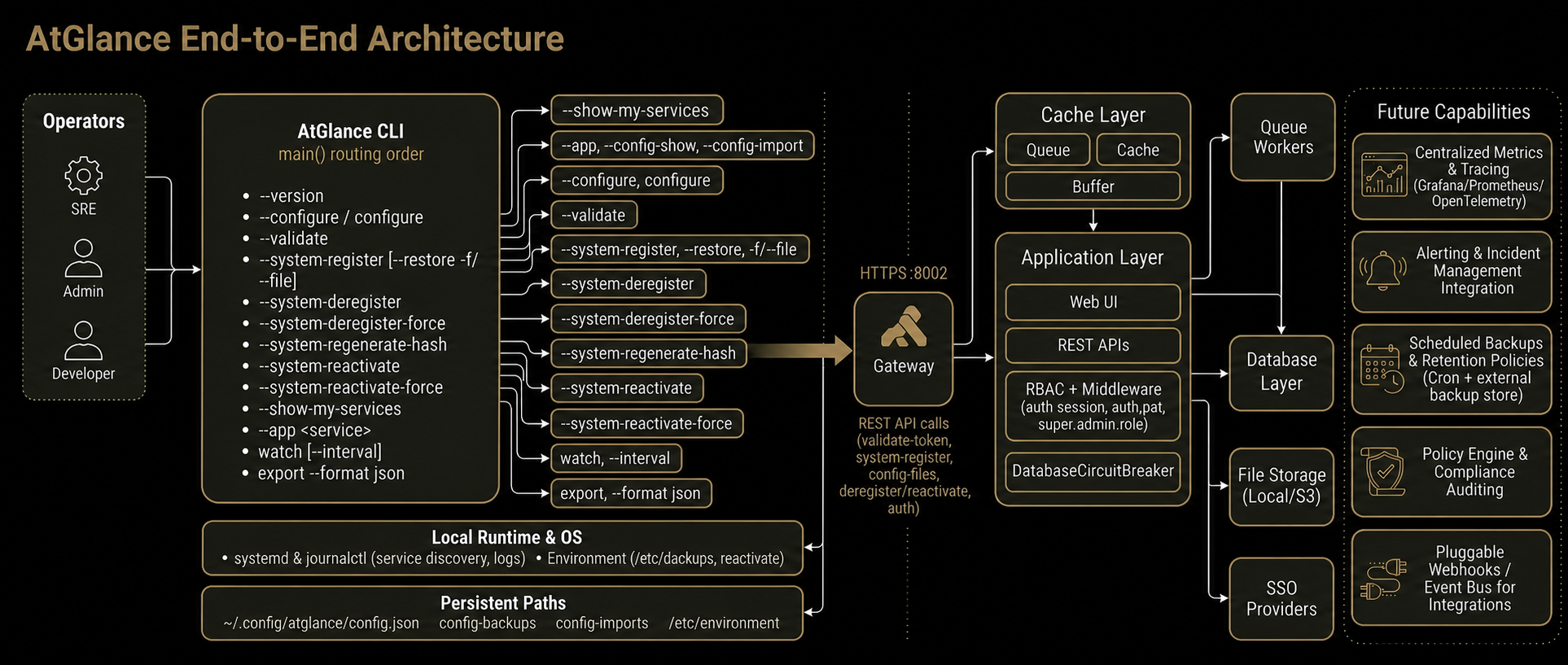
CLI agent
One static binary on every Linux host. Reads systemd and the journal, backs up unit files and talks to the console gateway with a personal API key or a service account key.
- ·
status, service <name>, watch, export - ·
login, whoami, check - ·
system register | deregister | reactivate | rotate-key - ·
sync, config backup | list | diff | restore - ·
schedule enable | status - ·
agent install | start | status (3.0)
Management Console
Application + REST API + database + cache. Deploy on-prem, in your VPC, or hybrid. RBAC, dashboards, configuration history.
- · Web UI for admin/user/superadmin
- · REST APIs behind a declarative, DB-less gateway
- · Queue workers with retry/backoff
- · DatabaseCircuitBreaker middleware
- · Storage: local, S3, NFS or Azure Storage
- · SSO: Google, Microsoft Entra ID, GitHub, GitLab, Okta
End-to-end
How they fit together
System lifecycle
Register · Deregister · Reactivate
A safe, idempotent flow for every host.
-
STEP 01registersudo atglance system register joins a workspace; the server keeps its own system key.
-
STEP 02syncsudo atglance sync backs up every changed unit file as a new version.
-
STEP 03deregistersystem deregister sets the system inactive; backups are refused until it is back.
-
STEP 04reactivatesystem reactivate brings the server back with its id, key and history.
Sample
A few lines to get going.
Settings live in /etc/atglance/config.json and /var/lib/atglance/ (root only).
bash
sudo apt-get install -y ./atglance_2.2.0_amd64.deb
sudo atglance login --server https://console.example.com
sudo atglance system register --workspace 1 --service-account
sudo atglance check
atglance status